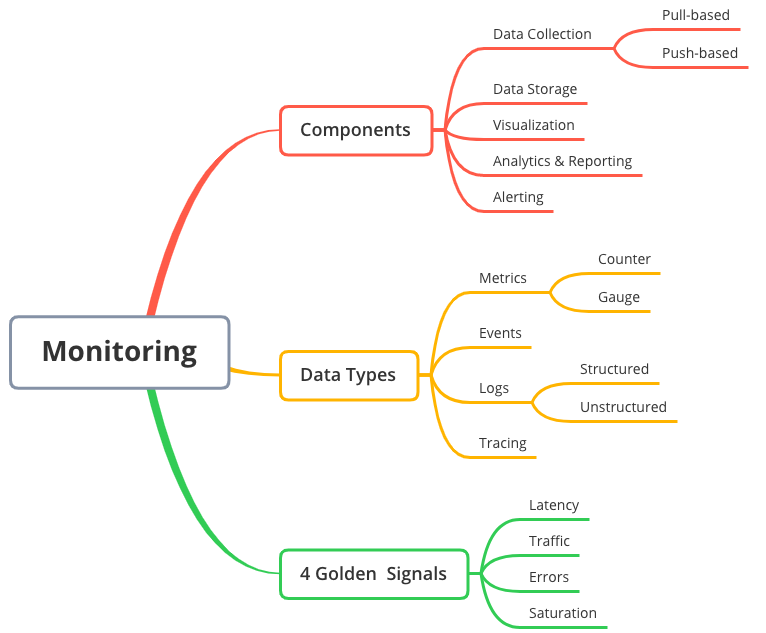
Modern applications are getting more complex. A full-stack app may have a front-end made with React or Angular, a back-end built with Node.js or Python, and a database connected to cloud services. In such systems, it can be hard to know what is going on when something breaks or slows down. This is where monitoring tools help, and one of the best new tools is OpenTelemetry.
OpenTelemetry is an open-source project that allows developers see what is happening inside their apps. It collects data from different parts of your app, so you can comprehend how it works and find problems faster. In this blog, we will explore what OpenTelemetry is, how it works, and why it is useful for full-stack developers.
If you are taking a full stack developer course in Hyderabad, learning how to monitor apps is just as important as building them. Monitoring helps you make sure your apps are fast, stable, and easy to fix when something goes wrong.
What Is OpenTelemetry?
OpenTelemetry (also known as OTel) is a tool that collects information from applications. This information can include:
- Traces – the path a request takes through your system
- Metrics – numbers like how fast your app is or how many users it has
- Logs – messages that show what your app is doing
With OpenTelemetry, you can send this data to monitoring platforms like:
- Prometheus
- Grafana
- Jaeger
- Zipkin
- New Relic
- Datadog
OpenTelemetry is useful because it supports many programming languages and works with many tools. This means you can use it in your full-stack projects no matter what language or platform you choose.
Why Monitoring Is Important for Full-Stack Developers
In full-stack development, you are responsible for the front-end, back-end, and often even the database and server. If something goes wrong, it can be hard to know where the problem is. Monitoring helps you:
- See where errors are happening
- Find slow parts of your app
- Track user actions
- Understand how your system behaves
Without monitoring, fixing bugs can take hours or even days. With tools like OpenTelemetry, you can fix problems faster and keep your app running smoothly.
Key Features of OpenTelemetry
OpenTelemetry has many features that make it a powerful tool for developers:
- Language Support
It works with many programming languages, such as:
- JavaScript
- Python
- Java
- Go
- .NET
- Ruby
This means you can use it in almost any full-stack app.
- Easy Integration
OpenTelemetry provides SDKs and libraries that make it easy to add to your app. You can also use auto-instrumentation to collect data without writing a lot of code.
- Open Standard
It is not owned by any company. It is sponsored by the Cloud Native Computing Foundation (CNCF), which means it is free and open for everyone.
- Works with Many Backends
You can send data from OpenTelemetry to many different tools, like Prometheus, Grafana, or commercial tools like New Relic or Datadog.
If you’re taking a full stack developer course, adding OpenTelemetry to your projects can help you understand how apps work in real-time and how to make them better.
How OpenTelemetry Works
OpenTelemetry collects data using three types of information:
- Traces
Traces show the path of a request as it moves through your app. For example, when a user logs in, a trace can show how long it took for the front-end to send a request, how long the back-end took to respond, and whether there were any errors.
- Metrics
Metrics are numbers that show how your app is performing. Examples include:
- Response time
- CPU usage
- Memory usage
- Number of requests per second
These help you understand your app’s health.
- Logs
Logs are simple messages that tell what your app is doing. Logs can show errors, actions, and events.
OpenTelemetry collects all this data and sends it to a backend tool, where you can view it in charts, tables, or dashboards.
Steps to Use OpenTelemetry in a Full-Stack App
Let’s look at the basic steps to add OpenTelemetry to a full-stack project.
Step 1: Install the SDK
Choose the language you’re using and install the OpenTelemetry SDK. For example, in a Node.js app, you would use:
npm install @opentelemetry/api @opentelemetry/sdk-node
You can also install auto-instrumentation plugins to collect data automatically.
Step 2: Set Up the Exporter
The exporter is what sends the data to your monitoring tool. OpenTelemetry supports many exporters. You can choose to export to:
- Console (for testing)
- Jaeger (for tracing)
- Prometheus (for metrics)
- Other tools like Datadog or New Relic
Step 3: Add Instrumentation
You can manually add code to record traces, logs, and metrics. Or use auto-instrumentation that records them for you.
Example in Node.js:
const { trace } = require(‘@opentelemetry/api’);
const tracer = trace.getTracer(‘example-app’);
app.get(‘/login’, (req, res) => {
const span = tracer.startSpan(‘login-request’);
// your login logic here
span.end();
res.send(‘Login successful’);
});
Step 4: View the Data
Once OpenTelemetry is sending data, go to your monitoring tool to view it. You’ll see charts, timelines, and logs that show how your app is working.
Real-World Example
Imagine you built an online shopping site. Sometimes users complain that the checkout is slow. With OpenTelemetry, you can track each step of the checkout process:
- Front-end: Button clicked
- Back-end: Payment processed
- Database: Order saved
Using traces, you see that the payment step takes too long. Now you can focus on fixing that part.
This is how OpenTelemetry helps full-stack developers find problems quickly.
Benefits of Using OpenTelemetry
Here are some simple reasons why OpenTelemetry is a great choice:
- Saves time when finding bugs
- Helps improve performance
- Works with many tools and languages
- Supports both front-end and back-end monitoring
- Easy to set up and expand as your app grows
These benefits make OpenTelemetry a must-have for modern full-stack development.
Common Challenges and Tips
Like any tool, OpenTelemetry has some challenges:
- Setup Can Be Complex
It may take time to understand how all the parts work. Start with basic setup and grow slowly.
- Too Much Data
OpenTelemetry can generate a lot of data. Use sampling to limit what you collect and send.
- Needs Backend Tools
You’ll need to connect OpenTelemetry to a backend like Jaeger or Prometheus. Make sure your team knows how to set these up.
Tips:
- Start small with one feature or page
- Use auto-instrumentation first
- Test everything in a development environment before going live
- Use dashboards to keep track of important data
Career Benefits for Full-Stack Developers
Knowing how to monitor apps with tools like OpenTelemetry makes you a stronger developer. Companies want people who can build and maintain apps that are fast and reliable.
As more apps move to the cloud, skills like tracing, metrics, and observability are in high demand. If you’re planning to take a full stack developer course, learning monitoring tools will help you stand out from others.
Final Thoughts
OpenTelemetry is a powerful tool that helps full-stack developers understand how their apps work. By collecting traces, metrics, and logs, it gives you a full picture of your system. This helps you fix bugs faster, improve performance, and create better apps.
Whether you’re building small projects or large systems, using OpenTelemetry can make your development process smoother and smarter. If you’re studying in a full stack developer course in Hyderabad, adding OpenTelemetry to your toolkit will give you real-world skills that employers value.
In the end, building a great app is not just about writing code it’s about making sure the app runs well, stays fast, and gives users a good experience. Monitoring tools like OpenTelemetry help you do just that.
Contact Us:
Name: ExcelR – Full Stack Developer Course in Hyderabad
Address: Unispace Building, 4th-floor Plot No.47 48,49, 2, Street Number 1, Patrika Nagar, Madhapur, Hyderabad, Telangana 500081
Phone: 087924 83183